An abacus calculator is a digital version of an abacus that helps people represent numbers and understand how calculations work by moving beads. It can be useful for children who are learning number values, parents helping with practice, and teachers explaining basic arithmetic.
Unlike a standard calculator that displays an answer after you enter a sum, an abacus shows numbers through bead positions. This makes it easier to see how digits relate to ones, tens, hundreds and larger place values.
In this guide, you will learn how to use an online abacus calculator, read numbers, practise simple calculations and avoid common mistakes.
Quick answer: An abacus calculator is a virtual counting tool that uses movable digital beads to display numbers and support basic maths practice. Depending on its design, it can help learners practise number representation, place value, addition and subtraction.
Try the interactive abacus
This five-rod soroban represents whole numbers from 0 to 99,999. From left to right, the rods represent ten thousands, thousands, hundreds, tens and ones. Only beads moved toward the central beam count: an upper bead is worth five and each lower bead is worth one, multiplied by that rod’s place value.
Tap or click a bead to move it. With a keyboard, use Tab to enter the frame, arrow keys to select a bead, and Enter or Space to move it. Read the live value above the frame. Clear resets every rod to zero; Show 2,468 loads a demonstration.
You perform the arithmetic by moving the beads yourself. This tool displays their value; it does not automatically solve typed sums or teach every bead-movement technique. For example, show 23, then add one ten; to add four ones to three, add five and remove one. The result reads 37. For 35 − 12, remove one ten, then subtract two ones by removing five and adding three. The result reads 23.
Reads
0
For hand technique, use Abacus Basics. For more problems to solve on this bead simulator, use the practice bank and answer keys.
What Is an Abacus Calculator?
An abacus calculator is an online or digital version of a traditional counting tool. Instead of moving physical beads with your fingers, you interact with beads displayed on a computer, tablet or mobile screen.
Each bead represents a value according to the design of the abacus. In a place-value teaching tool, columns may represent ones, tens, hundreds, thousands and higher values.
For example, the number 352 contains:
- 3 hundreds = 300
- 5 tens = 50
- 2 ones = 2
Therefore:
352 = 300 + 50 + 2
The purpose of the tool is not only to display a number. It also helps learners understand how that number is built.
For a broader introduction to the physical tool, read our guide to what an abacus is and how it works.
How to use this bead simulator
- Select Clear to reset all five rods to zero.
- Choose the ones rod at the right; the rods to its left represent tens, hundreds, thousands and ten thousands.
- Tap a bead to slide it, or use Tab to enter the frame, arrow keys to choose a bead and Enter or Space to move it.
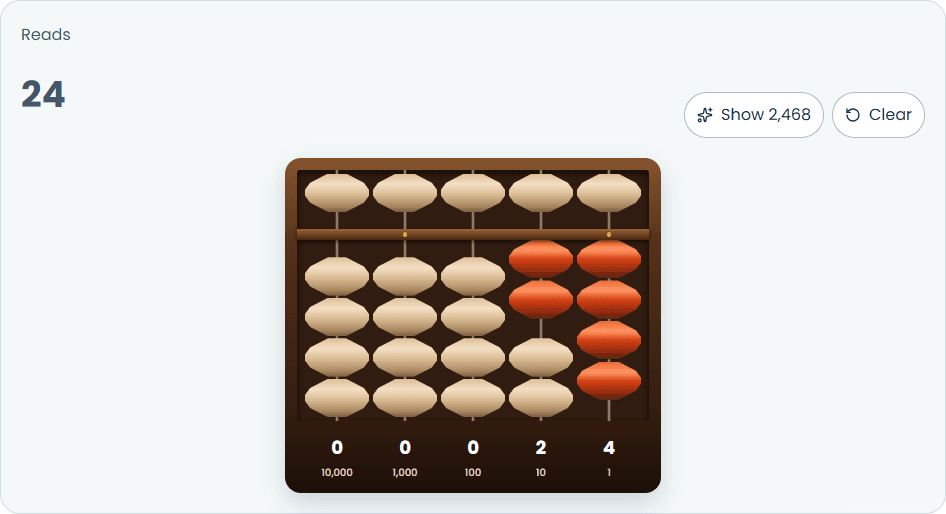
- Read the live value above the frame. To show 24, activate two lower tens beads and four lower ones beads. To show 503, activate the upper hundreds bead, leave tens at zero and activate three lower ones beads.
- Select Show 2,468 for a prepared example; select Clear before the next exercise.
How to Read Numbers on an Abacus
The easiest way to understand an abacus is to break a number into place values.
| Place | Value | Example |
|---|---|---|
| Thousands | 1,000 | 2 thousands = 2,000 |
| Hundreds | 100 | 3 hundreds = 300 |
| Tens | 10 | 4 tens = 40 |
| Ones | 1 | 6 ones = 6 |
These place values help us understand numbers without memorising each number as a separate pattern.
Example 1: Show the Number 24
To represent 24 on a place-value teaching abacus:
- Find the tens column.
- Set the digit to 2.
- Find the ones column.
- Set the digit to 4.
- Read the result as 2 tens and 4 ones.
The calculation is:
24 = 20 + 4
Example 2: Show the Number 503
The number 503 is useful because it contains a zero in the tens place.
Break it down:
- 5 hundreds = 500
- 0 tens = 0
- 3 ones = 3
Therefore:
503 = 500 + 0 + 3
Set the hundreds digit to 5, leave the tens digit at zero and set the ones digit to 3.
Do not remove the empty tens place when reading the number. If you did, you might read 503 as 53, which is incorrect.
This is one reason visual number tools can be useful for beginners: they make each place-value position easier to discuss.
How to Practise Addition and Subtraction
An abacus can be used to practise arithmetic, but the exact bead movements depend on the type of abacus and the method being taught.
The examples below explain the arithmetic and place-value changes. Follow the instructions built into your calculator when moving its beads.
Addition Example: 23 + 14
First, break each number into tens and ones.
- 23 = 2 tens + 3 ones
- 14 = 1 ten + 4 ones
Add the tens: 20 + 10 = 30.
Add the ones: 3 + 4 = 7.
Combine the results:
23 + 14 = 30 + 7 = 37
On a place-value teaching tool, the final display should represent 3 tens and 7 ones.
For more detailed addition methods and practice, read Abacus Addition.
Subtraction Example: 35 − 12
Break down both numbers.
- 35 = 3 tens + 5 ones
- 12 = 1 ten + 2 ones
Remove one ten from three tens: 30 − 10 = 20.
Subtract the ones: 5 − 2 = 3.
Combine the results:
35 − 12 = 20 + 3 = 23
The final display should represent 2 tens and 3 ones.
For additional worked methods, visit our guide to Abacus Subtraction.
Online Abacus Calculator vs Physical Abacus
Both tools can help learners see numbers, but they offer different experiences.
| Feature | Online abacus calculator | Physical abacus |
|---|---|---|
| How you use it | Click or move digital beads | Move real beads by hand |
| Convenience | Available on a compatible device | Needs to be carried or kept nearby |
| Resetting | Often available through a reset control | Beads are moved back manually |
| Physical feedback | Touch feedback depends on the device | Learners can feel the beads move |
| Best use | Screen-based demonstrations and practice | Hands-on practice and guided technique work |
A digital tool can make demonstrations convenient, especially during online lessons. A physical abacus provides direct contact with the beads, which can be useful when a trainer is teaching hand movements.
Neither option automatically replaces good instruction. The learner still needs to understand place value and follow a consistent method.
To compare different designs, read our guide to types of abacus.
Who Can Use an Abacus Calculator?
Children learning numbers
Children can use a digital abacus to explore how numbers are built from ones, tens and hundreds. Start with small numbers before moving to larger ones.
Parents supporting home practice
Parents can use the calculator to demonstrate a number, ask a child to represent it and check the result together. Keep practice sessions short and focus on accuracy before speed.
Teachers and tutors
Teachers can use an interactive abacus during a lesson to show number patterns, demonstrate place value and discuss arithmetic steps with a group.
Beginners revising abacus concepts
Learners who already know the basics can use a digital frame to review number representation and practise simple calculations.
For more worked exercises, explore Abacus Examples.
Common Mistakes to Avoid
1. Reading only the beads you can see
Read every place-value column, including columns that represent zero.
2. Mixing different abacus designs
A Soroban, Suanpan and a simple classroom counting frame may use different bead arrangements. Do not apply the rules of one design to another without checking.
3. Changing several values without checking the result
Practise one number at a time. Read the display before moving to the next exercise.
4. Focusing only on speed
Accuracy and understanding should come first. Speed is not useful if the learner repeatedly represents the wrong number.
5. Treating a calculator as a complete course
A digital abacus is a practice aid. It does not automatically teach every calculation method or replace a structured learning programme.
Abacus Calculator Practice Questions
Practise these exercises by representing each number on your virtual abacus. Then check your answers.
- Show the number 16.
- Show the number 240.
- Show the number 1,205.
- Calculate 12 + 15.
- Calculate 46 − 23.
Answer key
| Question | Answer |
|---|---|
| 1 | 16 |
| 2 | 240 |
| 3 | 1,205 |
| 4 | 27 |
| 5 | 23 |
For more beginner-friendly exercises, use the worked examples in our Abacus Examples guide.
Frequently Asked Questions About Abacus Calculators
What is an abacus calculator?
An abacus calculator is a digital tool that uses bead positions to represent numbers. Depending on its design, it can support number learning and arithmetic practice.
Is an abacus calculator free to use?
Some online abacus calculators are free, while others may have restrictions or paid features. Review the tool’s usage rules before you start using it.
Can children use an online abacus calculator?
Yes. A simple tool can help children explore number representation and place value. Younger learners may still benefit from adult guidance and a physical abacus.
Can an abacus calculator add and subtract numbers?
Many tools support number representation and can be used to demonstrate addition and subtraction. The features you can use vary depending on how the tool is built. Some tools display beads only, so learners must perform the calculation themselves.
What is the difference between an abacus calculator and a normal calculator?
A normal calculator usually displays a numerical answer after you enter an operation. An abacus calculator represents numbers with beads, making the place-value structure visible.
Is an online abacus the same as a physical abacus?
The basic learning idea may be similar, but the experience is different. A physical abacus has movable beads that learners can touch, while a digital version uses screen controls.
Can I learn abacus only with an online calculator?
An online calculator can support practice, but it may not teach every technique. A learner should use clear instructions and, where needed, guidance from a qualified trainer.
How can I practise with an abacus calculator?
Start by representing small numbers, then move to larger numbers. Once you can read the display accurately, practise simple addition and subtraction and check each answer.
Conclusion
An abacus calculator can make numbers easier to explore by showing how digits fit into place-value columns. With simple examples and regular practice, learners can use it to review number representation and basic arithmetic.
Begin with small numbers, check each bead position carefully and build confidence before attempting more difficult exercises. Use the digital tool as a learning aid, and refer to the relevant abacus guides when you need a deeper explanation.